


Frequently Asked Questions
Category
Why is the knob on my MonsGeek M1 V5 keyboard not working?
2025-06-13
If your M1 V5 knob has no function, please follow these steps to troubleshoot:
- Reset the keyboard using the shortcut in the manual: Long press Fn + ~ for 5 seconds to eliminate software-related issues.
- Test the encoder directly by pulling off the knob and rotating the encoder stem.
- If the encoder responds: The issue may be knob wear. Add a small piece of paper inside the knob to improve contact and friction.
- If there’s no response from the encoder:
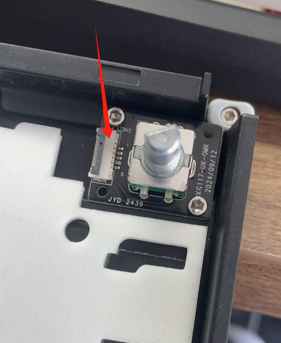
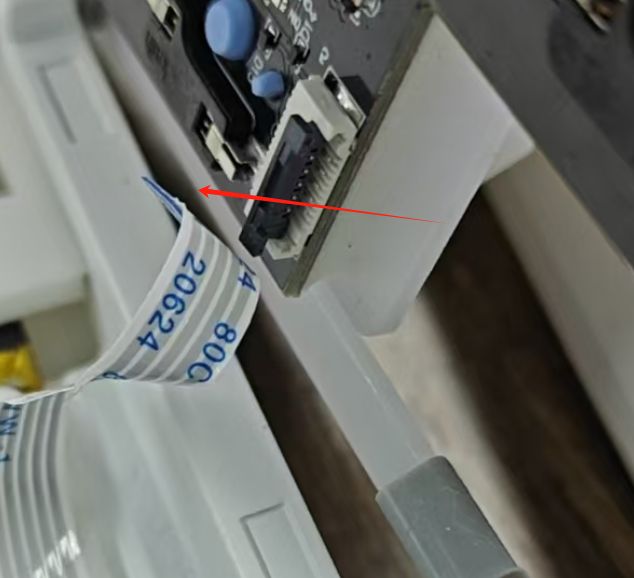
- Check the knob cable connection—especially if the keyboard is new or recently modded.
- Make sure both ends of the cable (knob and PCB sides) are firmly connected.
- Disassembly guide: Refer to this video to access the knob cable:
How to open M1 V5- Pull out the knob
- Separate the top and bottom case
- Locate the knob cable beneath the knob module
- Pull the connector clip outward, remove and reinsert the cable, and press the clip back down to lock it securely.
If the issue persists after checking these steps, the encoder or knob module may require replacement.