

Frequently Asked Questions
Find answers to common questions about our keyboards, setup guides, and troubleshooting solutions
Found 0
results for ""
No results found
Try different keywords or browse categories
If you’ve ruled out USB power settings and ensured the receiver is plugged directly into the computer (not through a hub), the issue may be related to the receiver firmware.
Update the Receiver Firmware:
Download the latest firmware: Receiver Firmware Update
⚠️ This firmware is ONLY for the FUN60 Max/Ultra 8K 2.4G receiver — using it on other devices may cause them to stop working.
Before Updating:
- Disconnect all other receivers: Unplug any other wireless device receivers from your computer, leaving only the FUN60 receiver connected.
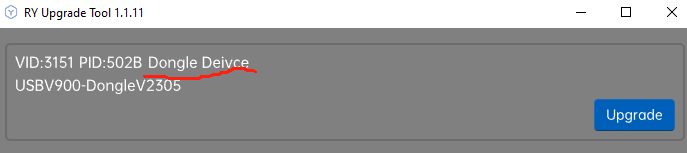
- Confirm you’re updating the right device: Ensure only the keyboard’s receiver (dongle)as below is being updated to avoid damaging other devices. Press upgrade to start.
Re-Pair the PCB and Receiver(if needed):
- Activate 2.4G Mode: Quickly press Fn + Y — the Y key’s LED will flash slowly, confirming the mode is active.
- Enter Pairing Mode: Press and hold Fn + Y for 3 seconds until the Y LED flashes rapidly. Simultaneously insert the receiver/dongle into the computer.
- Confirm Pairing: When pairing succeeds, the Y LED stays lit for 2 seconds. If the device isn’t detected within 30 seconds, the LED will turn off, and the keyboard will enter sleep mode. Repeat steps 1 and 2 if needed.
If the above firmware update still doesn’t resolve the issue, there are two more things to check::
- Wireless Interference:
The 2.4GHz signal can be affected by interference from nearby devices, especially USB 3.0 ports and HDMI cables. Try moving the receiver to a different USB port (preferably on the front panel or further away from other cables). - Outdated Keyboard Firmware:
An outdated firmware version may also cause instability with wireless connections.Please connect your keyboard via wired mode, go to the MonsGeek Driver > About – Firmware Update section, and check if a firmware update is available.