
What is Dynamic Keystroke (DKS) and How It Transforms Your Gaming Experience
📅Feb. 12. 2026
If you’ve been following the gaming peripheral scene recently, you’ve likely heard the buzz around Magnetic Switch Keyboards (like the MonsGeek M1 V5 TMR, Akko MOD68 , or Veekos Shine60 HE). While everyone talks about “Rapid Trigger,” there is another feature that is potentially even more game-changing: Dynamic Keystroke (DKS).
But what exactly is DKS? Is it just a glorified macro? And most importantly, is it allowed in competitive games? In this guide, we dive deep into the technology that is changing how we interact with magnetic switch keyboards.
What Exactly is Dynamic Keystroke (DKS)?
Simply put, Dynamic Keystroke (DKS) is an advanced input technology that allows a single key to trigger up to four different actions throughout its “life cycle.”
To understand the difference, look at traditional mechanical keyboards: they operate on a simple “0 or 1” digital logic—the key is either on or off, with no middle ground. DKS changes this by enabling continuous detection, similar to the analog triggers on a game controller.
By tracking the key’s movement in real-time, DKS can sense exactly how deep you press or how far you release. This transforms a standard button into a multi-functional tool, allowing you to assign different commands to different depths instead of being limited to a single signal.
But how does this logic work in practice? Let’s look at the four trigger points.
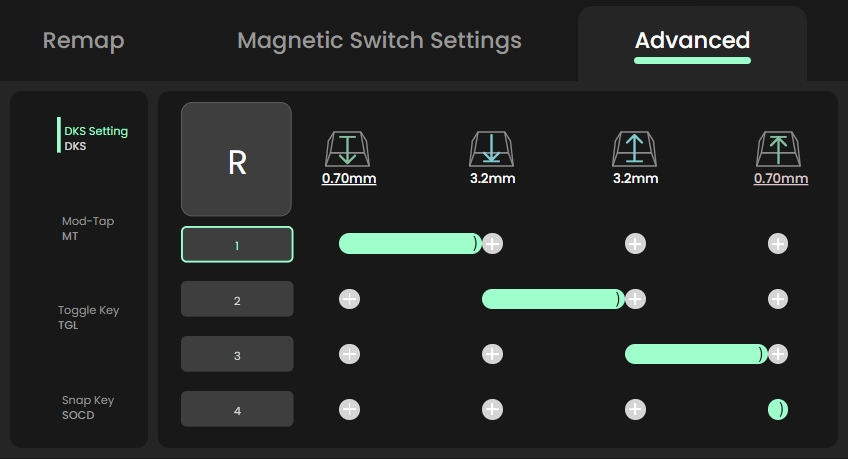
(DKS settings interface in MonsGeek driver)
- The Pressing Phase: Depth with a Purpose
- R1 (Light Press): Triggers Command A at a shallow depth (e.g., 0.70mm).
- R2 (Deep Press): Triggers Command B as you bottom out (e.g., 3.20mm).
- Game Scenario: A light tap makes your character walk, while pressing all the way down automatically triggers a sprint—no extra keys required.
- The Releasing Phase: The Elegant Exit
- R3 (Initial Lift): Triggers Command C as the switch begins to bounce back (e.g., 3.20mm).
- R4 (Full Release): Triggers Command D as the key returns to its rest position (e.g., 0.70mm).
- Game Scenario: In a MOBA or fighting game, press down to cast a massive ability, and the instant you lift your finger, your character automatically follows up with a basic attack or a quick dash to safety.
Is DKS Exclusive to Magnetic Switch Keyboards?
Not entirely.
Dynamic Keystroke requires continuous detection of key travel, which is most commonly enabled by magnetic switch technologies such as Hall Effect. Other analog sensing approaches—including TMR-based magnetic sensing or certain optical and analog switch designs—may also support DKS when paired with appropriate firmware and software implementation.
Traditional mechanical switches rely on discrete electrical contacts and fixed actuation points, and therefore typically cannot provide the continuous input data required for Dynamic Keystroke functionality.
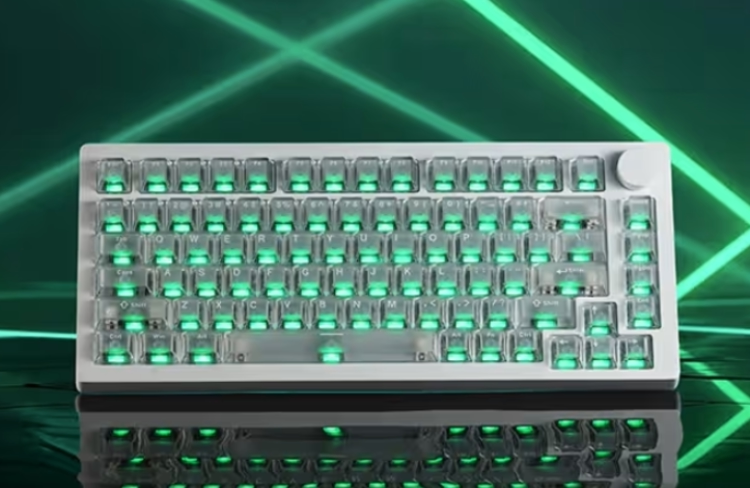
DKS vs. Keyboard Macros: Key Differences
Dynamic Keystroke is often compared to keyboard macros, but the two technologies are fundamentally different.
| Feature | Dynamic Keystroke (DKS) | Keyboard Macros |
|---|---|---|
| Input Type | Analog: Measures how far you press. | Digital: Measures if you pressed. |
| Execution | Manual & Linear: Actions follow your finger's exact movement. | Automated: Executes a pre-defined script independently. |
| Timing | Fluid: Adapts to your reaction speed. | Static: Operates on a fixed timeline. |
| Category | Input Remapping (Hardware-driven) | Process Automation (Software-driven) |
In essence:
DKS changes how a key responds to physical input, while macros automate what happens after a key is pressed.
Practical Applications: How Gamers and General Users Use DKS
DKS isn’t just theory—it changes how you play and interact with your keyboard. By mapping multiple actions to a single key, you can simplify complex mechanics that used to require multiple keys and perfect timing.
FPS Games: Precision and Speed
- In tactical shooters like CS2 or Valorant, DKS allows flawless counter-strafes and instant utility use. For example:Perfect Counter-Strafe: Set one key so pressing triggers movement and releasing triggers the opposite direction. You stop instantly for pixel-perfect shots without extra keys.
- Grenade Combo (Optional): One key can equip, pull the pin, and throw—turning a three-step process into a single motion.
MOBA & Action Games: Frame-Perfect Plays
- For games like League of Legends or Naraka: Bladepoint, DKS lets you execute ultra-fast combos with one key:One-Key Burst: Map Ultimate to light press and Flash to deep press. Frame-perfect combos now happen faster than any human finger could tap.
- Smart Cast: Light press shows ability range, bottom-out or release fires the ability—perfect aim and speed in one fluid motion.
Creative & Productivity Uses
- DKS isn’t only for gaming. It brings controller-like analog feel to keyboards and simplifies repetitive tasks:Analog Movement: Map R1 to walk, R2 to sprint for smoother, pressure-based motion.
- Productivity Shortcuts: Map deep press to Ctrl+C and release to Ctrl+V, or light press for Alt+Tab and deep press for Win+D—actions become rhythmic, precise, and effortless.
Finding Your Sweet Spot: How to Calibrate Your R1–R4 Points
Four trigger points give you powerful control, but the real key is how you space your R1–R4 settings. A good setup balances fast response with deliberate input. Here’s a simple way to dial it in.
Downward Sequence (R1 & R2): Action Points
These trigger as you press the key down. For shooters, set R1 at 1.00–1.50 mm for quick activation, and R2 near the bottom at 3.00–3.50 mm. The wider gap helps prevent accidental double inputs and keeps deep presses intentional.
Upward Sequence (R3 & R4): Reaction Points
These trigger as you release the key. Set R3 slightly above bottom-out (around 2.50 mm) so actions register as soon as you lift your finger. Place R4 near the top (about 0.50 mm) to cleanly reset the key.
Avoid the “Cramp”
Don’t place all four points too close together. If the spacing is too tight, multiple actions may trigger at once. Each stage should feel distinct.Pro Tip
Start with 0.80–1.00 mm between each point. Once you’re comfortable, you can tighten the spacing for faster execution.
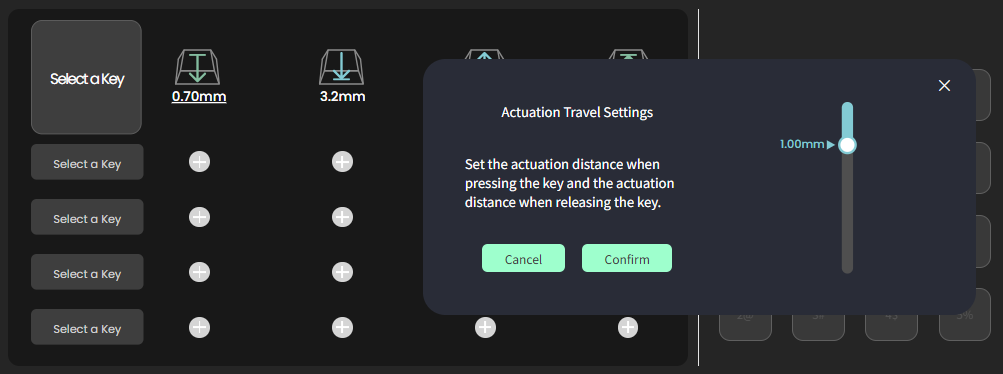
(Screenshot of the MonsGeek driver interface, showing adjustable trigger points with precision up to 0.01 mm.)
Is Dynamic Keystroke Allowed in Competitive Gaming?
The acceptance of Dynamic Keystroke in competitive gaming depends on the game, league, or tournament rules.
Generally Accepted
- DKS does not automate actions
- Every function requires deliberate physical input
- It is often categorized as analog input, similar to controller triggers
Because of these characteristics, many games and competitive environments do not explicitly prohibit DKS.
Potential Restrictions
- Some tournaments restrict specific hardware features
- Certain games disallow any form of analog keyboard input
- Using DKS alongside macros or scripts may violate rules
Players participating in competitive or professional events should always review the official rules of the relevant game or tournament before enabling advanced keyboard features.
Final Thoughts
Dynamic Keystroke (DKS) changes how a keyboard key can behave. Traditionally, a key press is treated as a simple “0 or 1” signal — pressed or not pressed. DKS adds depth detection, so different actions can be triggered depending on how far you press a key. In practice, this means one key can handle multiple actions, whether for in-game combos or workflow shortcuts.
DKS isn’t meant for every scenario. How well it works depends on the switch sensors, firmware tuning, and how the target app or game reads input. If you’re playing in competitive events, it’s also worth checking the rules in advance — some tournaments place limits on advanced input features.
More broadly, DKS shows how keyboards are becoming more configurable rather than just faster. With magnetic switches, the focus is moving beyond trigger speed toward behavior control and personalization. Instead of only deciding when a key activates, you can also define how it responds to different press depths.
Further Reading
Learn more about the features of magnetic switch keyboards
➡️[Rapid Trigger Keyboards – The Ultimate Guide to Faster Gaming & Typing]