Frequently Asked Questions
Find answers to common questions about our keyboards, setup guides, and troubleshooting solutions
Found 0
results for ""
No results found
Try different keywords or browse categories
VIA only works in wired mode via the HID protocol. To connect, please set the toggle switch under the Caps Lock key to the middle and press Fn+U to enter wired mode.
Try online VIA: https://via.evove.top/ or https://usevia.app/
- Please use the right V3 .JSON file for the M1 V5 VIA without needing to toggle V2 definitions. You can download the JSON file on the Download Page or below(link save as to download): ANSI:M1_V5_VIA_V3_ANSI.json;ISO:M1_V5_VIA_V3_ISO.json
- Load V3 JSON File: Load the corresponding V3 JSON file for your VIA keyboard. Ensure that the “Use V2 definitions” option is turned off when loading the V3 JSON file. You may need to load 2-3 times to let your keyboard be detected.
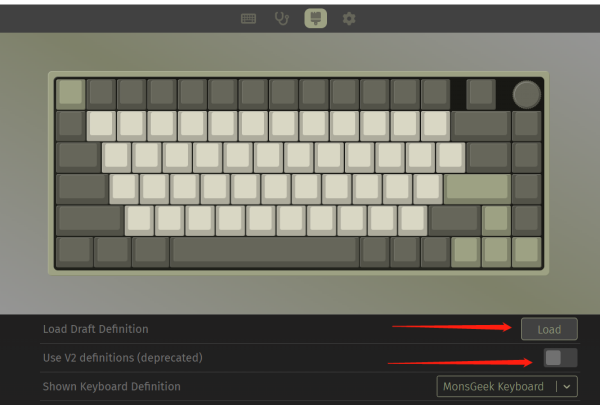
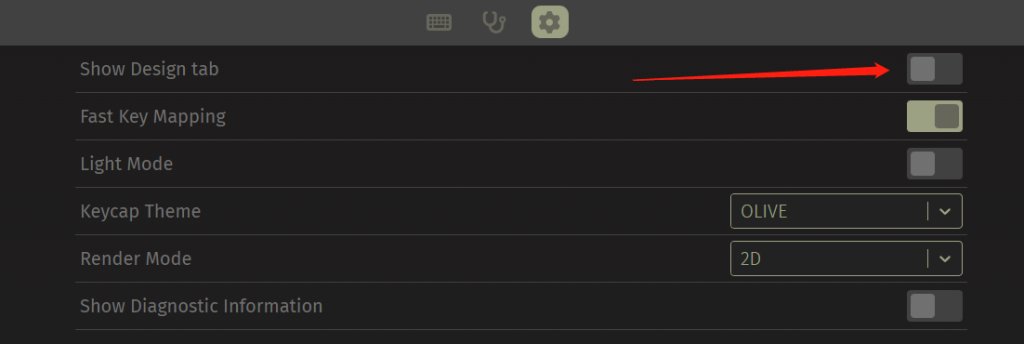
If you cannot find the load button, make sure you have opened the Design tab as shown below.