Frequently Asked Questions
Find answers to common questions about our keyboards, setup guides, and troubleshooting solutions
No results found
Try different keywords or browse categories
Please download the appropriate software for your computer system. The software supports the following keyboard models: M1W V3, M1W HE, M1 HE, MG108, MG108W, MG75, MG75W, MG75S HE, M1W, M7W, M3W, M5W, ICE75, and the M1, M2, M3, M5, M6, M7, M1 V3 Domestic Version. Note that QMK/VIA versions are not compatible.
MonsGeek Driver:https://www.monsgeek.com/download/
For Linux System: To customize your device, please use a Mac or Windows system first. Once customization is complete, you can use the device on a Linux system with its saved settings.
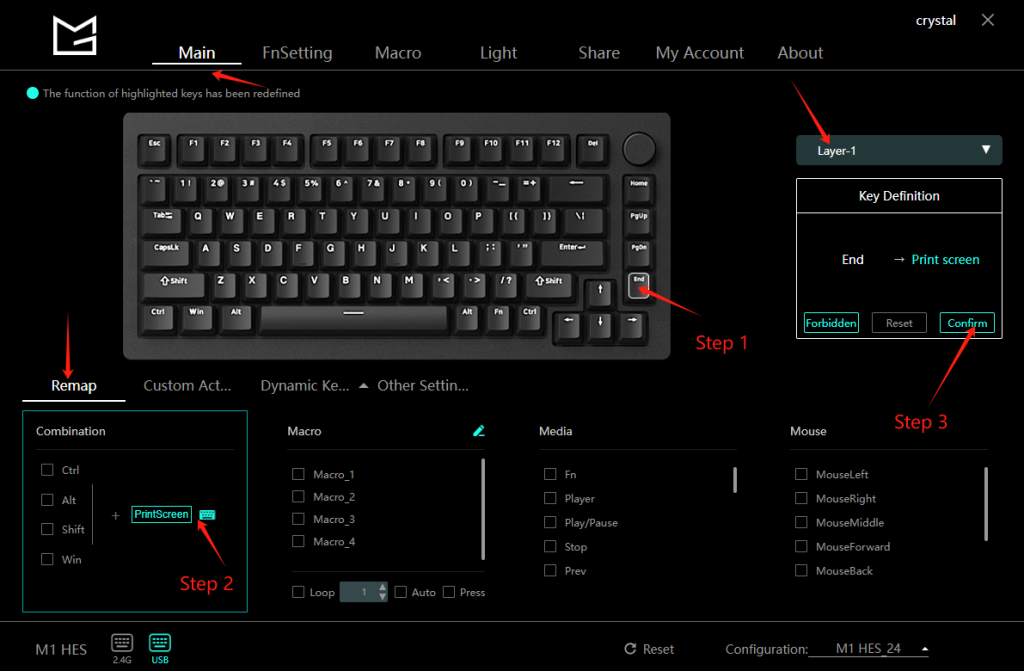
To remap the “Home” key to “PrintScreen” in Layer-1, follow these steps:
- Select the “Home” key in the Main Section.
- Choose the “PrintScreen” key in the Remap Section.
- Click the “Confirm” button.